
Home › Features › Scheduling & dispatch
Scheduling & dispatch · Free
See every job and every tech on one board.
Book the work, assign the right tech and keep customers in the loop from a day, week, month or list view. It’s free, with no limit on how many dispatchers or techs you add.
No credit card · no contract · unlimited users
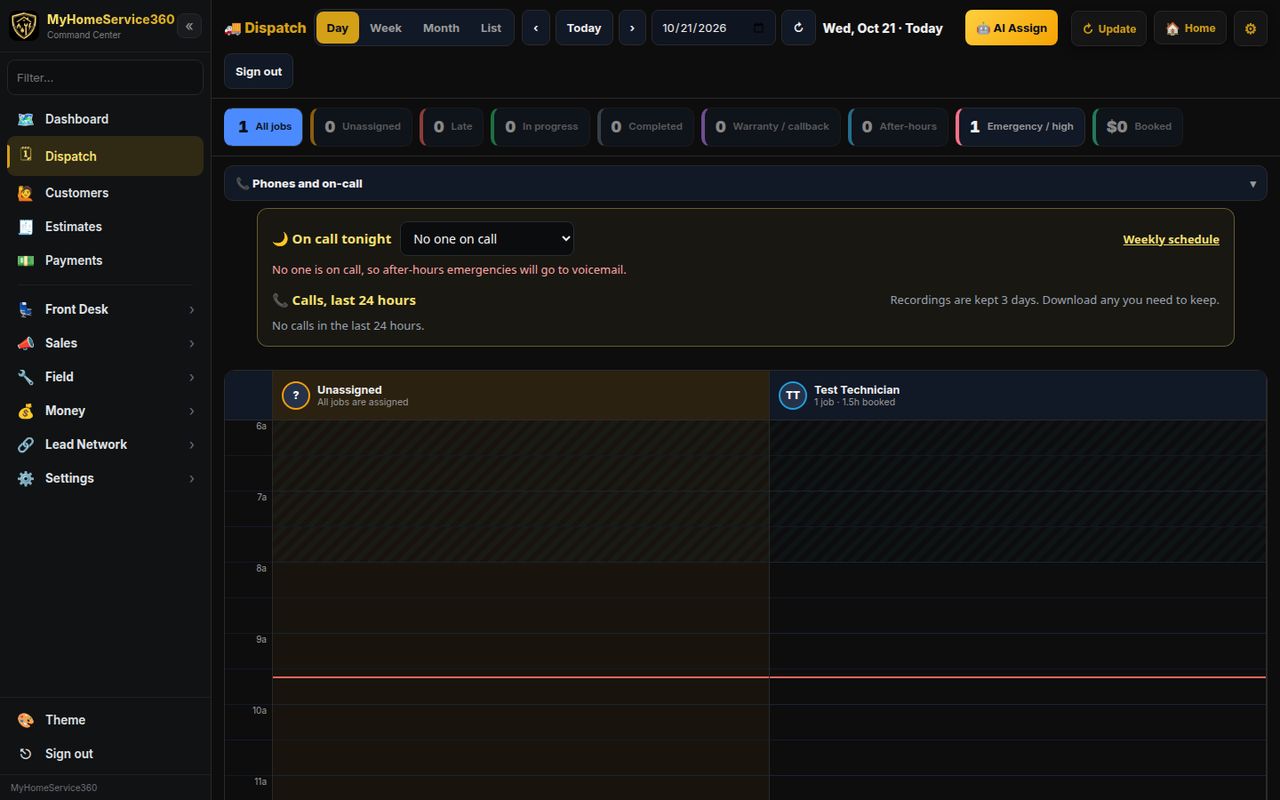
Real screen from MyHomeService360. Names and numbers are sample data.
Scheduling & dispatch highlights
Assign in a click
Open a job and pick a tech, or let AI assign hand open jobs to the nearest tech who does that trade, weighing how busy each one is.
Repeat work runs itself
Set a job to repeat weekly, monthly, quarterly or yearly and the next visit lands on the board without anyone retyping it.
Customers know you’re coming
One tap sends an on-my-way text with your tech’s photo, and appointment reminders go out the day before.
A board you can read at a glance
Switch between day, week, month and list. Filter to unassigned, running late, in progress, warranty and callback, after-hours or emergency jobs, so the problems find you instead of the other way around.
- Day, week, month and list views
- Filters for unassigned, late and emergency work
- Phones and on-call panel right on the board
Know where the trucks are
When techs share location from the field app, the dashboard shows a live fleet map so you can send the closest truck to the next call.
- Live fleet map on the dashboard
- Location comes from the tech’s phone, nothing to install in the truck
- Multi-stop route sequencing Coming soon
Online booking that fills real slots
Customers pick a service and an open time, and the job lands on your board as scheduled. Prefer to confirm first? Use a booking request form instead.
- Bookable time slots by staff member
- Booking request and lead capture forms
- Instant confirmation for the customer
Included free
What’s included in Scheduling & dispatch
No add-on tiers. Every company gets all of it, with unlimited users.
- Day, week, month and list board
- AI auto-assign by distance, trade and workload
- Recurring jobs (weekly to yearly)
- On-my-way texts with the tech’s photo
- Day-before appointment reminders
- Live GPS fleet map
- Online booking page
- Unlimited dispatchers and techs
- Multi-stop route sequencing Coming soon
Works together
One login runs the rest of the shop, too
Field app for techs
Jobs, photos, checklists, sign-off and payment from the phone, even offline.
Learn more →Phone system & AI call checking
Call routing, recordings, transcripts and AI that checks caller details.
Learn more →Service plans & memberships
Maintenance agreements with visits, renewals, reminders and checklists.
Learn more →Invoicing & payments
Pay links, saved cards and deposits that post straight to your books.
Learn more →Scheduling & dispatch questions
Is the scheduling software really free?
Yes. Scheduling and dispatch are part of the free MyHomeService360 software. There’s no subscription and no charge per dispatcher or tech.
Can my customers book online?
Yes. You get a booking page where customers choose a service and an open time slot, and the job is created on your board. You can also use a request form if you’d rather confirm each one.
Do the texts cost anything?
Day-before reminders are built in. On-my-way and dispatch texts send through your own Twilio account, so Twilio bills you directly for those messages at their rates.
Does it handle recurring maintenance visits?
Yes. Any job can repeat weekly, monthly, quarterly or yearly. For plans you sell to customers, pair it with service plans.
Run the whole shop free, starting today.
Set up your company in a few minutes. No credit card, no contract, no per-user fees. Bring your crew and your customers.
$0 a month · unlimited users · card payments cost Stripe’s fee plus our 1%