
Home › Features › Estimates & proposals
Estimates & proposals · Free
Proposals the customer can pick, sign and pay a deposit on.
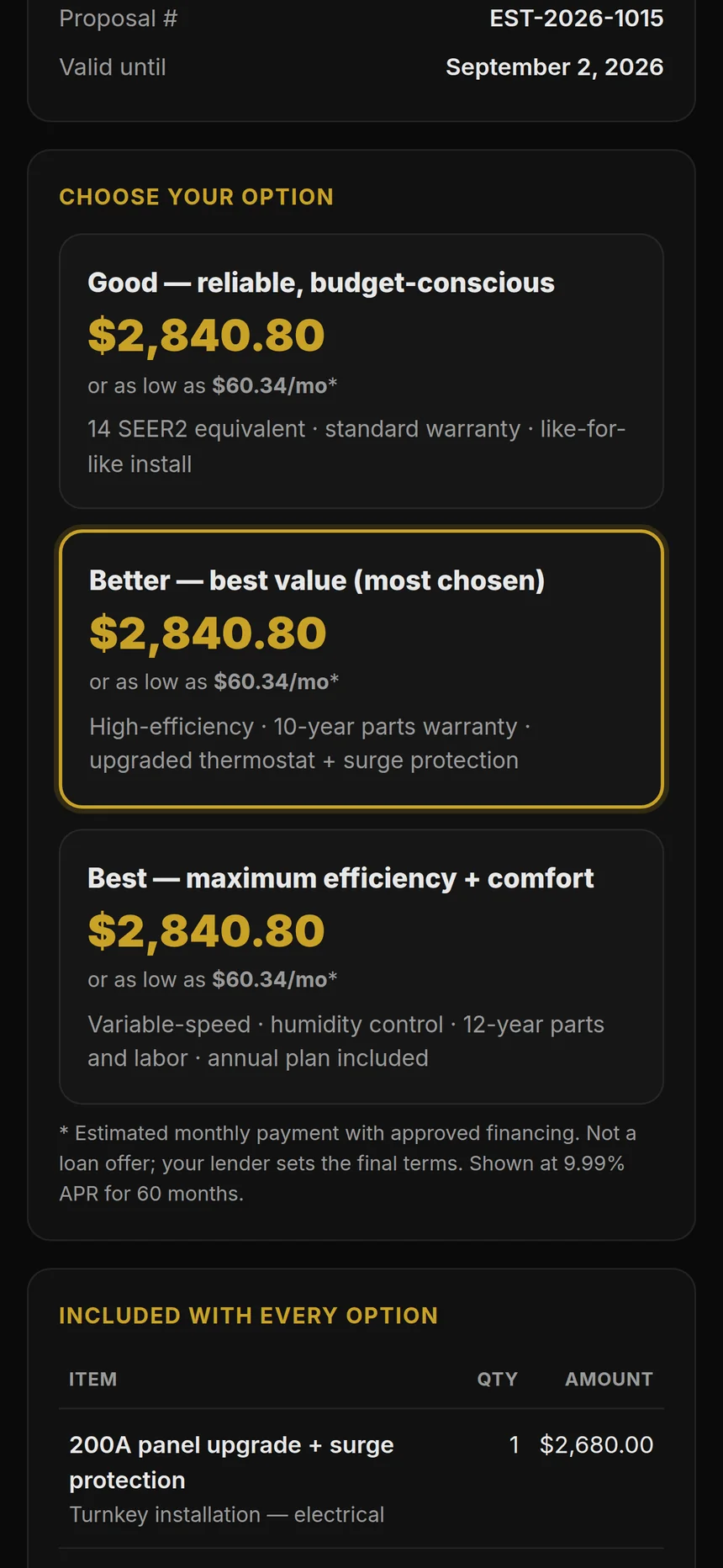
Build good, better and best options side by side with add-ons the customer can tick, or let AI draft the estimate from the tech’s notes and photos using only your price book. The customer picks, signs and puts down a deposit by card or bank from their phone, and every proposal moves through your pipeline on its own.
Free forever Not a trial. No card, no contract, unlimited users. Card payments cost 3.9% + 30¢. Our promise →
No credit card · no contract · unlimited users
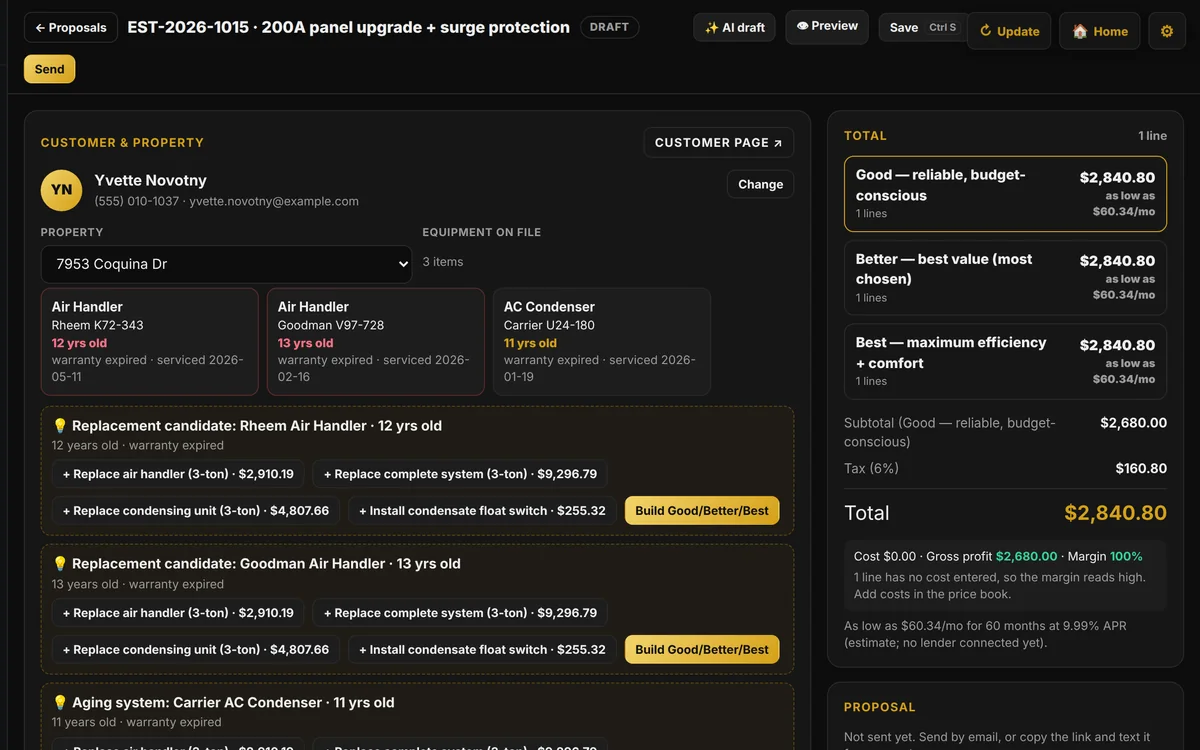
Real screen from MyHomeService360. Names and numbers are sample data.
Estimates & proposals highlights
Three options, side by side
Good, better and best from your price book, with add-ons the customer can tick and replacement suggestions based on the age of the equipment on file.
AI drafts from your notes
Type what you found or add a photo, and AI drafts the lines from your own price book. It never makes up a price: anything it can’t match comes back for the office to price.
Signed on the spot
The customer approves from the link and signs right on the page. You see it the moment it’s accepted.
Deposit up front
Collect a deposit by card or bank (ACH) on the approval page, or record a check or cash deposit. Held deposits apply to the invoice automatically.
Start from templates, not a blank page
Save estimate templates and job and task templates, set markup and margin rules, and import vendor catalogs so pricing stays consistent across the crew.
- Estimate, job and task templates
- Markup and margin calculator
- Vendor catalog import

From yes to invoice without retyping
When the customer approves, convert the estimate to an invoice in one step. Any deposit you’ve already collected comes off the balance.
- One-click convert to invoice
- Deposits applied automatically
- Inspection and job forms
- Warranty records
Proposals that run through your pipeline
Every proposal you send creates a deal in the built-in CRM, and the deal moves on its own: sent, viewed, won, scheduled, invoiced or lost. The Sales & Proposals hub puts the pipeline board, a follow-up queue and win-rate reports in one place.
- Pipeline board and follow-up queue
- See when the customer opened it, and how often
- Win-rate and close-rate reports
- Customer questions and change requests on the proposal
- Download or print as a PDF
From yes to the schedule
After the customer accepts, the proposal asks “When would you like this scheduled?” and creates the job. Approved work that isn’t on the calendar yet keeps reminding the office until it is. Big jobs can be billed in parts with progress invoices.
- “When would you like this scheduled?” after accept
- Office reminders for approved, unscheduled work
- Progress invoicing
- A service plan add-on on good, better, best proposals
Included free
What’s included in Estimates & proposals
No add-on tiers. Every company gets all of it, with unlimited users.
- Good, better, best options side by side
- Optional add-ons the customer ticks
- AI draft from notes and photos, priced from your price book only
- Replacement suggestions from equipment age
- Auto-written efficiency and warranty copy
- Email and text approval links
- E-signature on approval
- Deposits by card or bank (ACH), or record check or cash
- Customer questions and change requests
- View tracking
- PDF download
- Pipeline board, follow-up queue and win-rate reports
- Proposals create and move CRM deals
- Scheduling question after accept
- Progress invoicing
- Service plan add-on
- Estimated monthly payment display
- Convert to invoice with deposits applied
- Inspection forms and warranties
- Customer financing through a lender Coming soon
Works together
One login runs the rest of the shop, too
Price book
Flat-rate pricing loaded for your state, priced from your real costs.
Learn more →Invoicing & payments
Pay links, saved cards and deposits that post straight to your books.
Learn more →Customers & home record
Every customer’s history, equipment and pipeline, plus a free home app for them.
Learn more →Scheduling & dispatch
Day, week, month and list board with AI assign, crews, route optimization, repeat jobs and customer status texts.
Learn more →Estimates & proposals questions
Is it really free forever?
Yes. The software is free forever: scheduling and dispatch, customers, estimates and proposals, invoicing, accounting, your website and the apps, for unlimited users. It isn’t a trial, and there’s no credit card to start and no contract. Card payments cost 3.9% + 30¢, and ACH bank payments cost up to 1.8% (never more than $10). Paid add-ons are optional: the phone system is $79/month* (one business number with calls and texting, the AI receptionist, after-hours on-call dispatch and Compendium Capture), and payroll (coming December 2026) is $39/month + $6 per employee. Read the free-forever promise.
Can customers approve a proposal from their phone?
Yes. They open the link, choose an option, tick any add-ons, sign and pay a deposit by card or bank, all on their phone. They can also send you a question or ask for a change.
Does the AI make up prices?
No. It only picks items from your own price book, and the price always comes from your price book. Work it can’t match comes back as an unpriced line for the office to review.
Can I see if the customer opened it?
Yes. Each proposal shows when it was first opened, when it was last opened and how many times. Automatic proposal follow-ups are off until you turn them on.
Do you offer customer financing?
Not yet. A proposal can show an estimated monthly payment using the APR and term you enter, but there’s no lender connected today.
Does it work with my price book?
Yes. Options pull straight from your price book, including the state-priced starter book if you loaded one.
Run the whole shop free, starting today.
Set up your company in a few minutes. No credit card, no contract, no per-user fees. Bring your crew and your customers.
$0 a month · unlimited users · card payments cost 3.9% + 30¢
*Included minutes and texts cover typical use. Usage above the included amounts is billed as overage, and larger or high-volume companies may be quoted higher phone and texting rates. See our Terms.