
Use the built-in accounting
Your sales, payments, deposits and fees post to a real double-entry ledger on their own, so the books stay current without retyping.
Free forever Not a trial. No card, no contract, unlimited users. Card payments cost 3.9% + 30¢. Our promise →
Step 1: Open your books
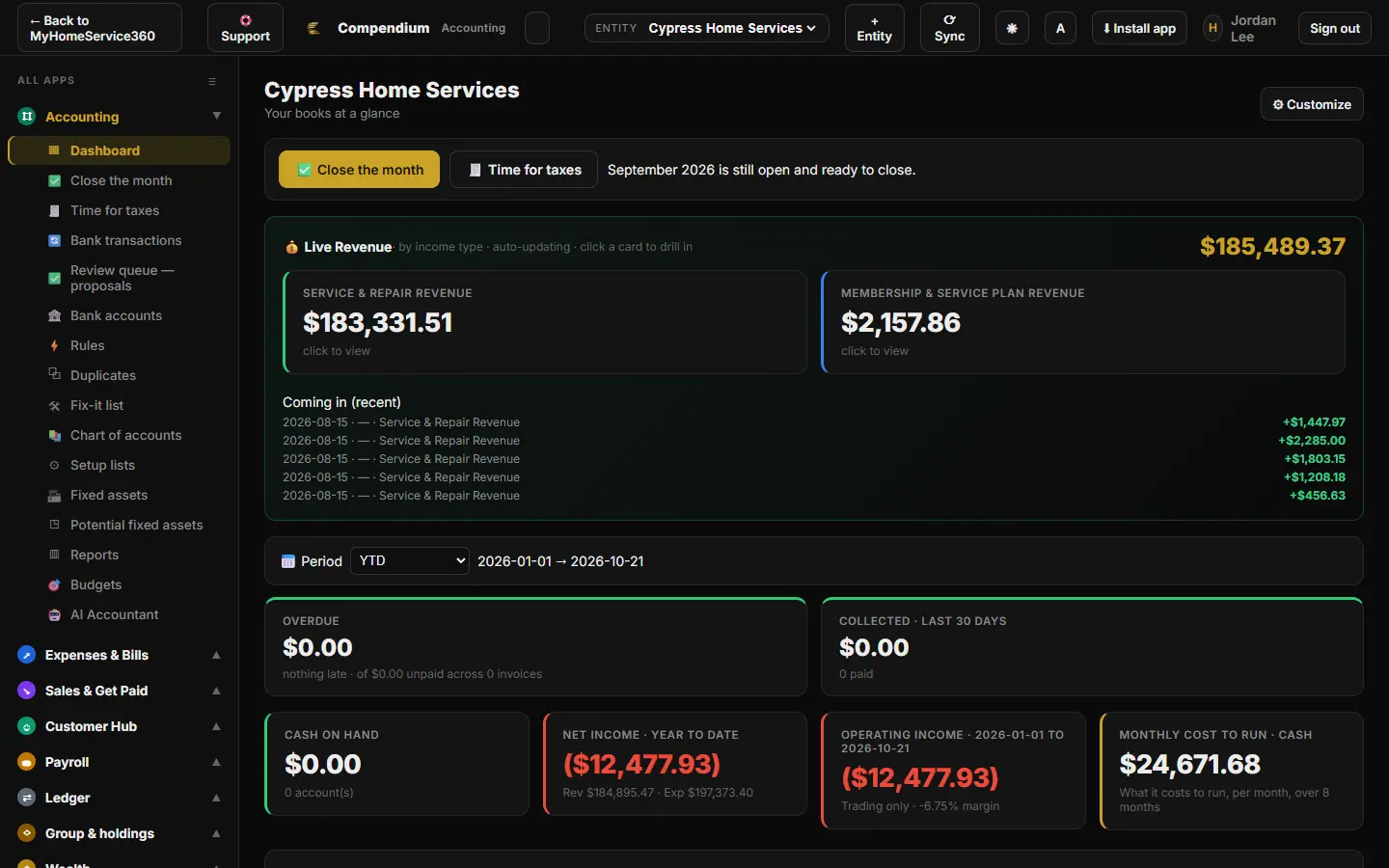
Click Money → Accounting. Your books open in the Compendium accounting app, already signed in; there’s no second password. Click ← Back to MyHomeService360 at the top left to return.
Step 2: Read the dashboard
The Dashboard shows live revenue by income type, what’s coming in, overdue invoices, cash on hand, net income and what it costs to run the business each month. Change the Period to look at any range.
Step 3: Know what posts on its own
Invoices, payments, deposits (held as a liability until they’re applied), refunds, purchase orders and job costs post to your ledger automatically from MyHomeService360. You don’t re-enter them.
Step 4: Connect your bank and review transactions
Open Bank accounts to connect your business bank, then Bank transactions to categorize what comes in. Set up Rules so repeat transactions categorize themselves, and work through the Review queue.
Step 5: Enter bills and expenses
Use Expenses & Bills for anything that happens outside MyHomeService360, like rent, fuel or a supplier bill. Online bill pay to vendors is optional: $39 a month per office, only in months you pay bills through it, plus Stripe’s cost at cost.
Step 6: Coming from QuickBooks
Give us read-only accountant access to your QuickBooks Online and we bring your history over: customers, past invoices as history jobs under the right customer, payments, and won proposals that aren’t done yet as jobs ready to schedule. We only read from QuickBooks. Nothing here ever writes to it or changes it.
Until your switch date, keep working in QuickBooks the way you do today; we copy anything new over once a day. From the switch date on, do your bookkeeping here. Records that came from QuickBooks are marked as imported and never post to your books a second time.
Step 7: Run reports
Open Reports for a profit and loss, balance sheet and general ledger for any date range, and Budgets to plan against. Your Chart of accounts is set up for you and can be edited.
Still stuck? Tell us what you were trying to do and where you got stuck. A screenshot helps.
Your ticks are saved in this browser only. Updated October 2026.
Questions about this
Can I stop using QuickBooks?
Many businesses do. The ledger is real double-entry accounting with reports your accountant can work from. Talk to your accountant before you switch.
Will this change my QuickBooks?
No. We only read it. Nothing is written to QuickBooks, and you can remove our accountant access any time.
Can my bookkeeper get access?
Yes. Add them with the Bookkeeper or Accountant role in Users & Permissions. There’s no charge per user.