
Bring your history over from Housecall Pro
Copy your customers, jobs, estimates, invoices, payments and price book from Housecall Pro with a read-only API key or your spreadsheet exports. Nothing in Housecall Pro changes.
Free forever Not a trial. No card, no contract, unlimited users. Card payments cost 3.9% + 30¢. Our promise →
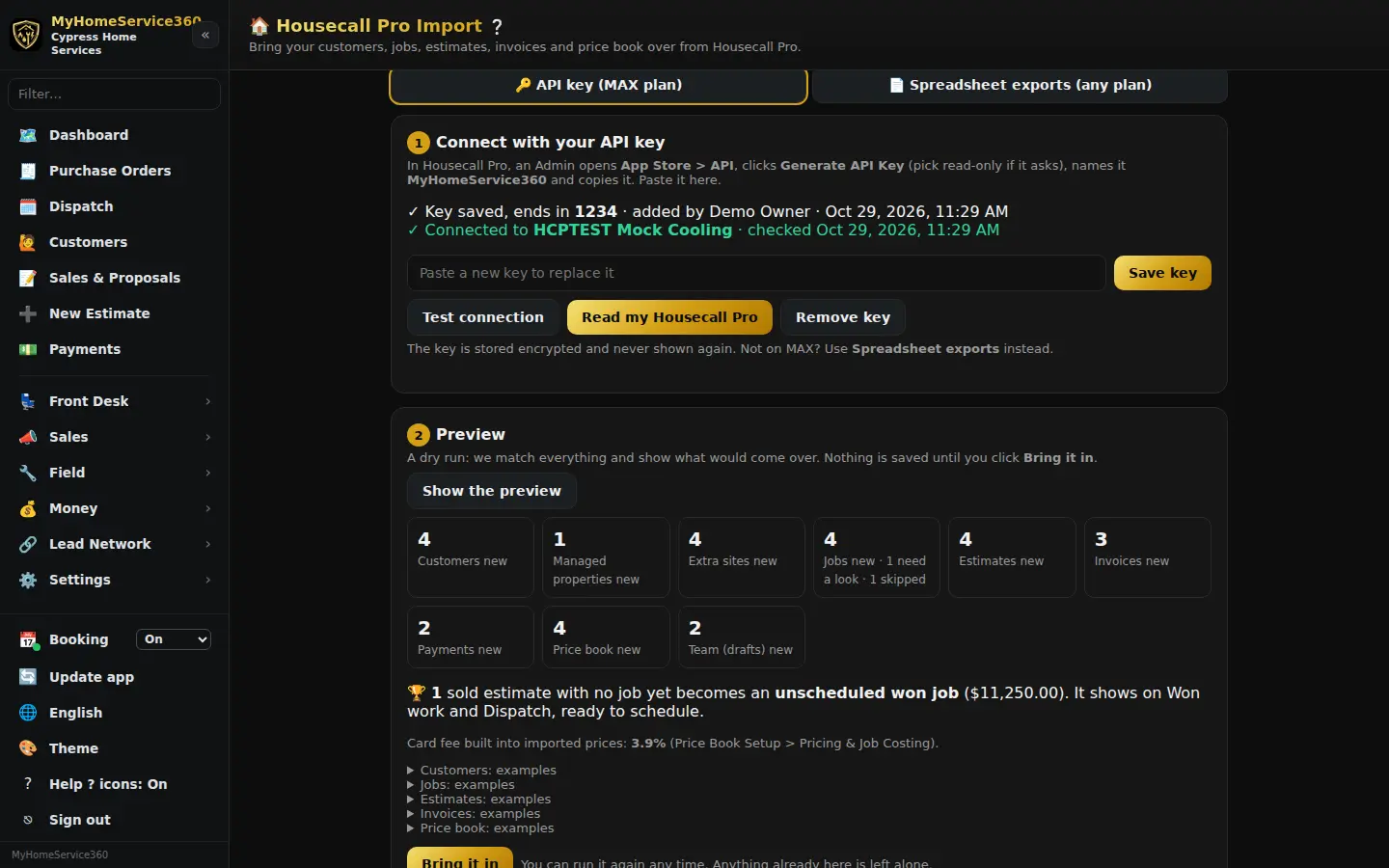
Step 1: Pick how you’ll bring it over
Open Settings → Housecall Pro Import. On Housecall Pro’s MAX plan, use an API key: it’s the fastest way and it keeps you in sync until you switch. On any other plan, use Spreadsheet exports. Either way, we only read from Housecall Pro. Nothing there is added, changed or deleted.
Step 2: Make your Housecall Pro API key
In Housecall Pro, sign in as an Admin, open the App Store, find the API card (it may be called API Key Management) and click Generate API Key. Pick read-only if it asks, name it MyHomeService360 and copy it. Paste it into the Housecall Pro key box and click Save key, then Test connection. You can also paste it in the Housecall Pro key box in your Getting Started doc, or read it to us on a call.
The key is stored encrypted and never shown again, only its last 4 characters. Please don’t text it or put it in a regular email.
Step 3: Or upload your exports
Not on MAX? Click Spreadsheet exports. Export each list from Housecall Pro (most lists have an Export or Download CSV button, or look under Reports): customers, jobs, estimates, invoices, payments, price book and employees. Pick what’s in the file, then drop it in. We match the columns for you and show which ones we used.
Step 4: Look at the preview
Click Read my Housecall Pro (key) or Show the preview (exports). It’s a dry run: you see how many customers, jobs, estimates, invoices and price book items will come over, how many match records you already have, and examples of each. Nothing is saved yet.
Step 5: Bring it in
Click Bring it in, then tap again to confirm. What happens:
- Customers are matched by email, phone or address, so nobody comes in twice. A customer with more than one address gets each one as a site, and “Client c/o Manager” names are set up as the manager with its client underneath.
- Finished jobs, their invoices and payments come in as history, numbered with the year in front (job 5101 from 2026 becomes 265101). History never posts to your books, and it doesn’t ask for reviews.
- Sold estimates with no job yet become unscheduled won jobs on Won work and Dispatch. Open jobs come over unscheduled too, with the Housecall Pro date and tech in the notes.
- Your price book comes in with your card fee built into the prices.
- Your team comes in as staff drafts. Nobody gets an invite.
- ThinkGrid reads your job notes for equipment and adds it as From Housecall Pro (unverified) until someone checks it.
Step 6: Fix anything that needs a look
Under Needs a look, pick the right customer for anything we couldn’t match, add it as a new customer, or skip it. Your Housecall Pro team is listed there too: click Add to Staff when you’re ready to invite someone. You can run the import again any time. Anything already here is left alone.
Step 7: Stay in sync until you switch
With an API key, set your switch (cut-over) date and turn Daily sync on. Keep working in Housecall Pro until then. Once a day we read anything new and bring it over the same way, and a bar at the top says Housecall Pro sync until your date. It stops on its own after that date. Once you’re comfortable, delete the key in Housecall Pro and our access ends.
Still stuck? Tell us what you were trying to do and where you got stuck. A screenshot helps.
Your ticks are saved in this browser only. Updated October 2026.
Questions about this
Does this change anything in my Housecall Pro?
No. We can only read from Housecall Pro. Nothing is added, changed or deleted there, and nothing here texts or emails your customers.
Will my old invoices show up in my books twice?
No. Invoices and payments from Housecall Pro come in as history and never post to your books.
Which Housecall Pro plan do I need?
API keys are on Housecall Pro’s MAX plan, made by an Admin. On any other plan, use the spreadsheet exports instead. You don’t need to upgrade.
Do photos and attachments come over?
With an API key, links to job attachments are kept in each job’s notes. Spreadsheet exports don’t include them. Tell us if there are important ones and we’ll help.