
Get a card reader
Order a Stripe Reader M2, follow it to your door, pair it with your phone and take tap, chip or swipe payments that land on the invoice.
Free forever Not a trial. No card, no contract, unlimited users. Card payments cost 3.9% + 30¢. Our promise →
Step 1: Connect Stripe first
Reader payments go to your bank through your own Stripe account, the same one your pay links use. If you haven’t connected it yet, the Card reader page says so and links you to Set up card payments. See getting paid.
Step 2: Order your reader
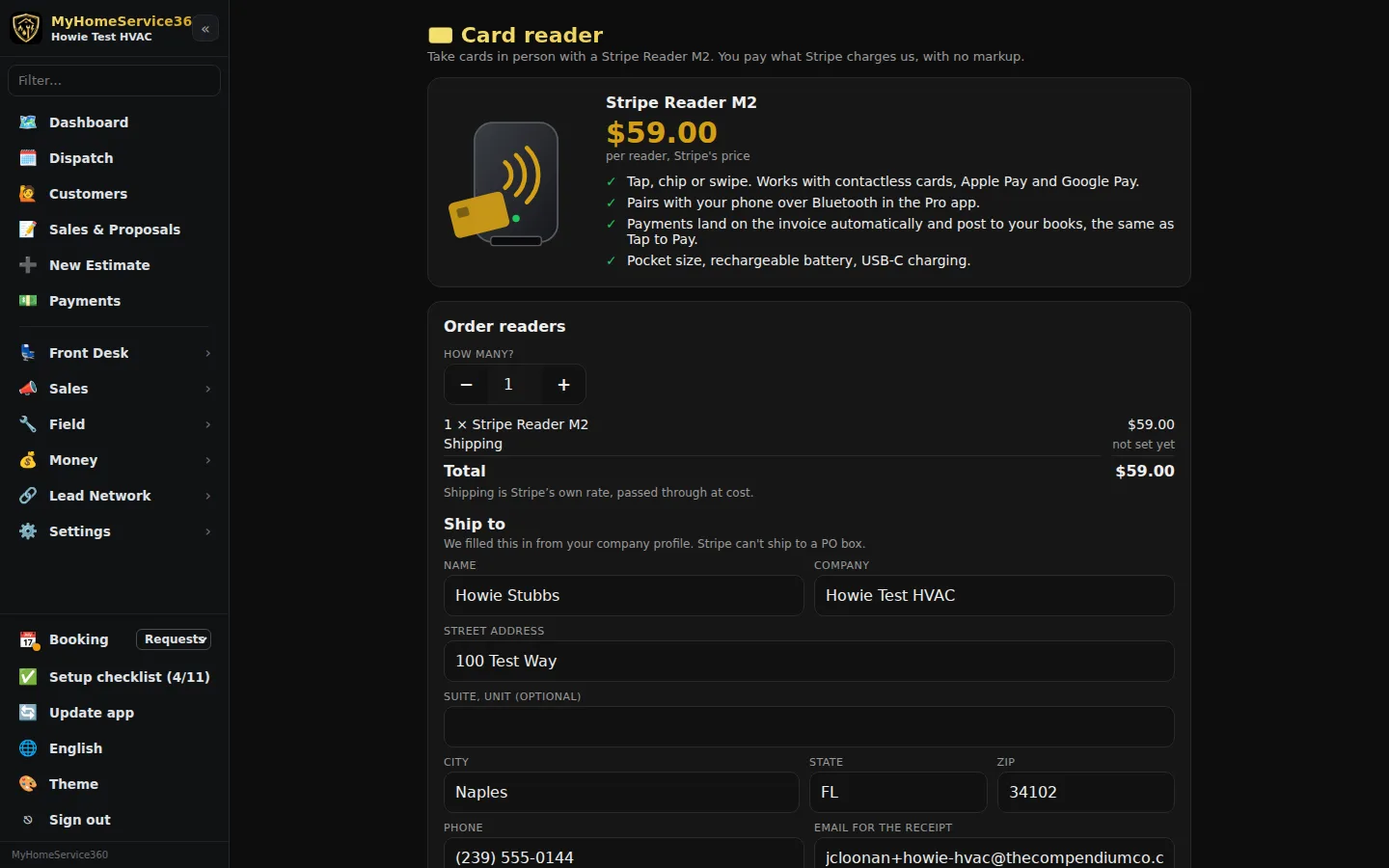
Open Money → Card Reader. You’ll see the Stripe Reader M2 and its price: $59 per reader, plus a $10 integration fee per reader and Stripe’s shipping, all shown before you pay. Pick how many, check the shipping address (we fill it in from your company profile; Stripe can’t ship to a PO box) and click Pay with Stripe Checkout. You pay on Stripe’s secure checkout page.
Only a company admin can place an order. Everyone else sees the page but not the order form.
Step 3: Follow your order
Once it’s paid, we order your reader from Stripe and it ships straight to you. The Card reader page shows each order moving from Paid to Ordered from Stripe, Shipped and Delivered, with a tracking link as soon as it ships. Your latest order also shows on Payments.
Step 4: Pair it with your phone
Charge the reader, turn it on, then open Money → Card Reader in the Pro app on your phone and tap Find my reader, then Connect. The app remembers it, shows its battery, and offers Install reader update when Stripe has one. Disconnect and Forget this reader are on the same page.
Coming with the next app update. Reader pairing arrives with our next Pro app update, and on iPhone once Apple approves our app. Until then, send a pay link.
Step 5: Take a payment
When you take payment on a job ticket in the app, tap Use card reader (it sits next to Tap card on phone). The customer taps, inserts or swipes on the reader. The payment lands on the invoice, clears it and posts to your books automatically, exactly like Tap to Pay. Card payments cost 3.9% + 30¢.
Still stuck? Tell us what you were trying to do and where you got stuck. A screenshot helps.
Your ticks are saved in this browser only. Updated October 2026.
Questions about this
What does the reader cost?
$59 per reader, the same as Stripe charges, plus a $10 integration fee per reader for linking it to your account, and Stripe’s Standard shipping. The Card reader page always shows the current total before you pay.
When can I order one?
Ordering opens soon. Until then the Card reader page shows the price and says Ordering opens soon.
Does it work with my iPhone?
Pairing arrives with our next Pro app update: on Android first, and on iPhone once Apple approves our app. Until then, send a pay link.
Do reader payments cost more than other card payments?
No. They cost 3.9% + 30¢, the same as any card payment.